

HTTPS names for dev environments that aren’t your laptop.
Run one daemon on the machine with the browser. Each container, VM, WSL instance, or remote box registers a stable name over a single TCP connection.
testd run app.example:3000 -- npm run dev
then open https://app.example.test
The host is the authority.
The browser never connects to the leaf. It resolves the name to the host, the host terminates TLS, and the host proxies to the target.
No Caddy, no per-project /etc/hosts edits, and no per-project certificates.
-
DNS for
*.testA built-in server on loopback answers each registered name with the host’s address, not the app’s.
127.0.0.1:7753
:53 on Windows -
HTTPS edge
Terminates browser TLS with rustls. Leaf certificates are minted on demand for registered names and live 24 hours.
0.0.0.0:443 -
Reverse proxy
Speaks HTTP/1.1 and handles WebSocket upgrades, so HMR connections work. The app receives the original
Hostheader.plain HTTP
to the app -
Local authority
The local CA, the operator secret, and the issued tokens live on the host. The root key is never copied to a dev environment.
~/.config/testd -
The connection
A leaf keeps one outbound TCP connection open and registers names on it. A crash or lost network releases them without a cleanup job.
:7737
NDJSON -
Leaf
The VM, container, WSL distro, or remote box that runs
testd runand serves the app.testd run
Three commands.
Two on the host, one in the project. The host appends .test, so app.example opens at https://app.example.test.
-
testd initHost setup, once. Creates the config, a local CA, and an operator secret. Run
testd doctor --fixto configure the.testresolver and install root trust. -
testd hostRuns the daemon. It owns DNS, the HTTPS edge, and the reverse proxy. The tray app can run it for you.
-
testd run :3000Registers the current directory, with the name inferred from it. Keep it running: closing the terminal removes the name.
Name it yourself, wrap a process, or publish several names on one connection.
testd run app.example:3000- An explicit name
testd run app.example:3000 -- npm run dev- The name lives as long as the process
testd run frontend:3000 api:8080 -- npm run dev- Two names, one connection
testd run 10.0.0.5:myapp:3000 -- npm run dev- A custom target host
Two labels, so cookies behave.
app.example.test and api.example.test share a registrable domain, so cookies behave like they do on app.example.com and api.example.com.
appservice .exampleproject .testfixed, and appended by the host
A single-label app.test works, but it is cross-site with every other project. testd prints a warning when you use one.
Labels take ASCII letters, digits, and hyphens. The name testd.test is reserved for the dashboard.
The connection is the lease.
A registration lives exactly as long as the TCP connection that created it. Permission lasts longer: a token is the key, its grants are the doors it may open, and a claim is a door currently held open.
https://app.example.test
- Tokenthe key
- Kept
- Grantthe doors it may open
- Kept
- Claima door held open
- Live on this connection
- Leaf
- Connected, and serving the name
Access by request, one name at a time.
A token covers exact names, not a project wildcard or everything a machine can reach.
-
On the leaf
testd run --host 192.168.1.5 :3000With no credential for this profile, the leaf asks the host for a grant and names the domains it wants.
-
On the host
testd requeststestd approve <id>A request waits up to two minutes. The dashboard’s Access card and the tray notification make the same decision.
-
On the leaf
~/.config/testd/credentials/defaultThe token is saved here with mode
0600, so later runs do not ask again. -
On the host
testd tokens --revoke <id>Publishing a new name raises its own request. Revoking a token closes its connections and releases its names.
Every live name, on one local page.
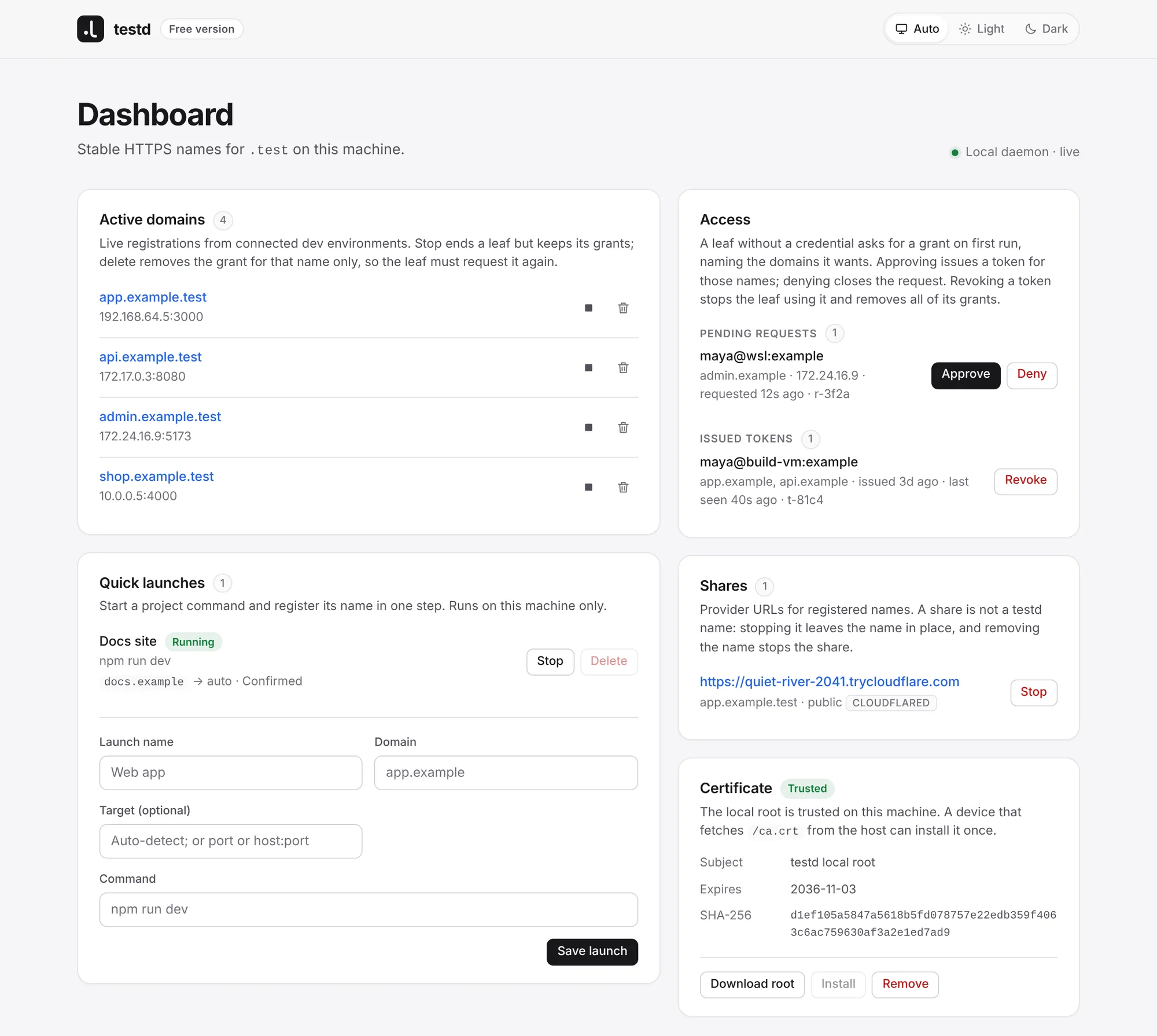
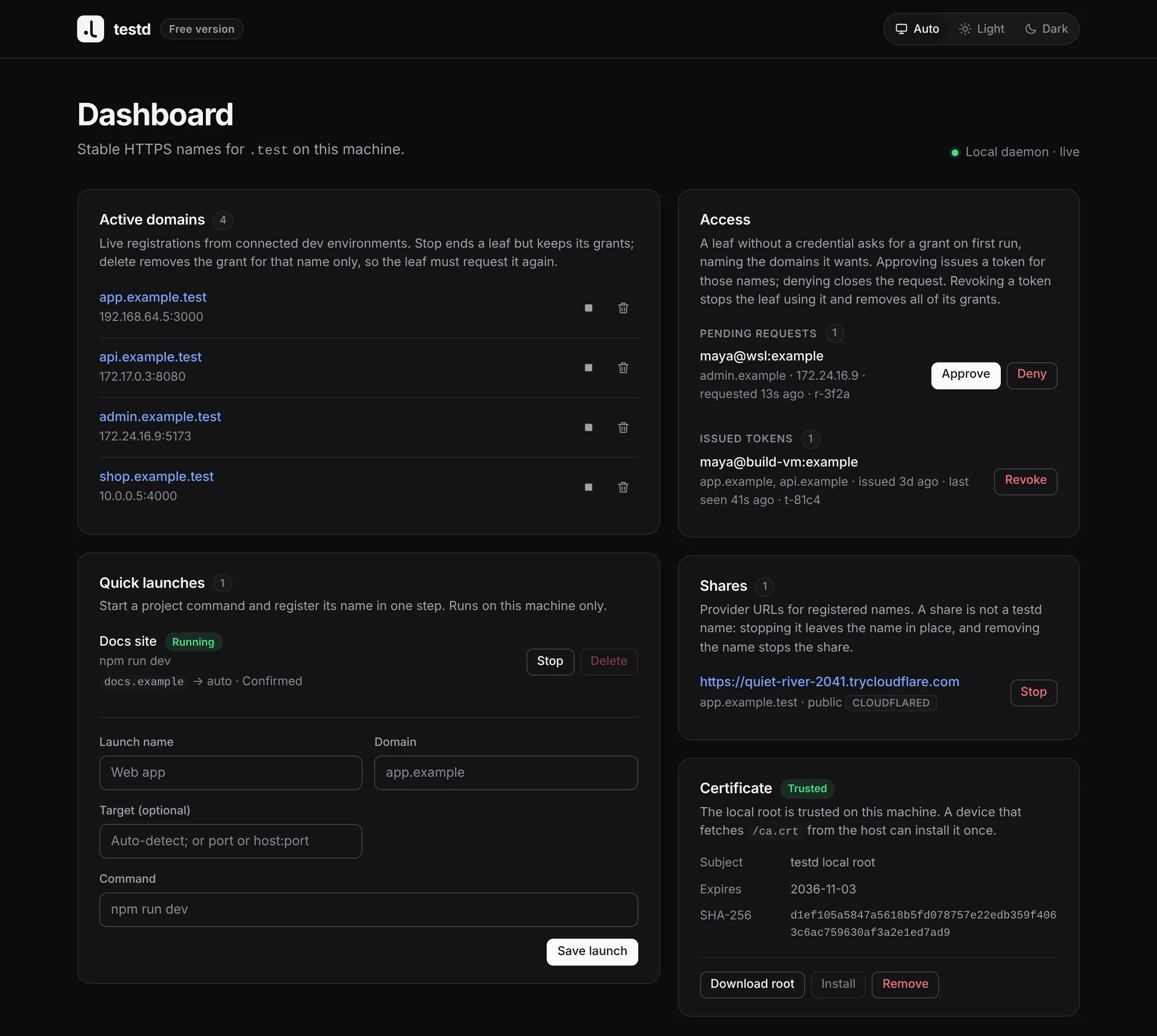
testd dashboard prints an authenticated URL. The page lists live names, shares, access requests, issued tokens, quick launches, and root trust, and updates without a reload.
It is served only on loopback, and the edge does not proxy it. A bare URL is read-only.
Tray app
Runs the daemon and opens the dashboard. On first start, a wizard sets up the DNS resolver, the root certificate, and the operator secret. It posts a notification while an access request waits.
Quick launches
A saved command, started from the dashboard or the tray. Each name moves through configured, probing, and confirmed, and is registered only after the target accepts.
When a name fails, the exit code names the layer.
testd doctor
testd doctor --json
testd doctor --fix--fix configures the resolver, writes a missing secret, and installs or reinstalls the root. While the daemon runs, it re-checks the resolver every 10 seconds and root trust every 60. On a desktop, activating the notification runs the repair.
- 0
- Ready
- 1
- Configuration or missing state
- 2
- Resolver or name resolution
- 3
- PKI, certificate trust, or the HTTPS edge
Four paths, and what protects each one.
testd is a development tool. It gives names and HTTPS to machines you control, and it assumes the host is the trust authority. It is not a production ingress controller, a public DNS service, or a multi-tenant platform.
Certificate lifetimes
- 10 yearsRoot CA, the trust anchor in the system store
- 1 yearIntermediate, renews near expiry without changing root trust
- 24 hoursLeaf, minted on demand for a name
Bars on a logarithmic scale, starting at one hour.
Bounded work
The daemon bounds work so a buggy or hostile local client cannot exhaust it without effort. These are robustness limits, not authentication.
- 256
- simultaneous intake connections
- 512
- edge connections, 64 per source address
- 64 KiB
- NDJSON frame
- 32 KiB
- HTTP request head
- 256 KiB
- HTTP request body
- 32
- pending access requests, two minutes each
- 1024
- cached edge certificates
Report a vulnerability
Use GitHub private vulnerability reporting, not a public issue. Expect an acknowledgement within 7 days and a fix or mitigation plan within 30 days.
What testd does not do
- No telemetry, usage data, or name reporting
- No public DNS or ACME dependency
- No vendor SDK for tunnels
- No remote administration API
- No guarantee of isolation between projects that share a host or a token profile
- No name that outlives its leaf connection or target
Install
0.1.0-alpha is the first public release, from 3 November 2026. The CLI, daemon, and tray ship as one version.
Desktop bundles are unsigned and installed by hand. Verify SHA256SUMS before installing.
From source, with Rust 1.89, or 1.90 for the tray
git clone https://github.com/LapilliWorks/testd
cd testd
cargo install --path ..tar.gz CLI, .dmg tray, generated Homebrew definitions. Apple Silicon and Intel.
.tar.gz CLI, .AppImage and .deb tray, x86-64. Port 443 needs CAP_NET_BIND_SERVICE or a high edge_addr.
.zip CLI, per-user NSIS installer, x86-64. DNS uses UDP 53, and NRPT rules route .test.
Leave when you like
testd uninstall
testd uninstall --purgeStop the daemon first. uninstall removes the OS resolver route and the trusted root. --purge also deletes ~/.config/testd. Run it before removing the tray app, because the OS uninstaller leaves both in place.
No in-app updater and no account. The binaries never check for a new version.
Documentation
- QuickstartInstall, prepare the host, start the daemon, and open the first name.
- Daily usageNames, targets, lifetimes, the dashboard, sharing, access requests, and troubleshooting.
- Advanced usageRemote leaves, profiles, grants, quick launches, tunnels, external fronts, and PKI.
- ReferenceCommands, options, configuration keys, files, endpoints, limits, and platform notes.
- SecurityTrust boundaries, credentials, exposure, hardening, and the incident checklist.
- Dependency policyThe advisory exceptions and MSRV constraints that the dependency gate accepts.